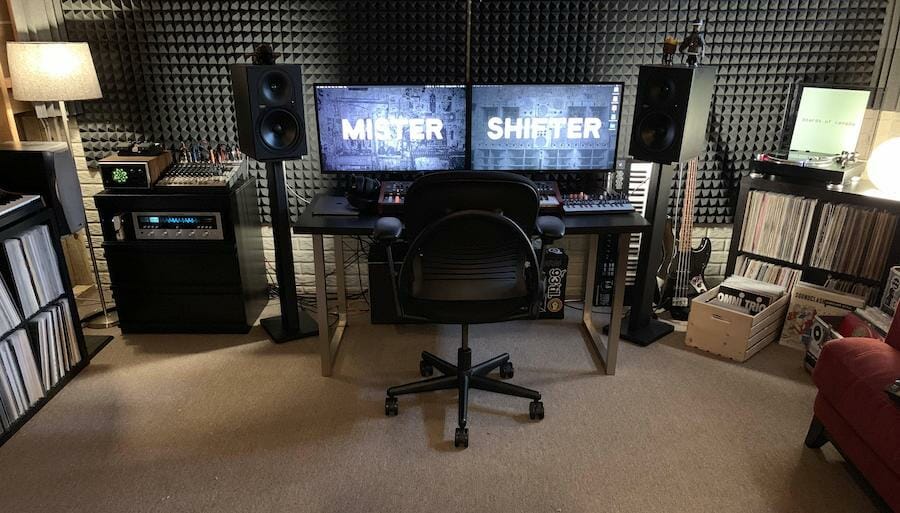
Creating the perfect studio setup is a goal shared by photographers, videographers, podcasters, musicians, and content creators around the world. Whether you are launching your first studio or upgrading an existing one, the right setup can boost productivity, enhance creativity, and elevate the quality of your work.
In this guide, we will explore essential studio setup ideas, covering everything from space planning and ergonomics to gear recommendations from leading brands like Sony, Canon, Shure, Rode, AKG, and more. We will also dive into lighting, acoustics, cable management, and aesthetic considerations.
1. Defining Your Studio Purpose
Before purchasing equipment or redesigning your space, ask yourself: What type of content will you produce? A photography studio setup has different requirements from a music production studio setup or a YouTube content creator setup.
Some common studio types include:
- Photography studios for portraits, products, and fashion
- Video production studios for YouTube, streaming, and corporate videos
- Home music studios for recording, mixing, and mastering
- Podcasting spaces for audio recording and interviews
- Live streaming rooms optimized for platforms like Twitch and YouTube Live
Clarifying your purpose will guide your decisions about space layout, gear selection, and budget.
2. Choosing the Ideal Space
Your studio’s physical space affects the final output quality. Consider the following aspects:
Room Dimensions and Shape
Larger rooms provide more flexibility for lighting and movement, while smaller rooms require strategic layout planning to avoid clutter. Rectangular rooms often offer better acoustic treatment options than square rooms.
Natural Light Availability
Natural light is ideal for photography and video. If your space has windows, consider using adjustable blinds or curtains to control light intensity.
Electrical Outlets and Power
Ensure your studio has sufficient electrical outlets and power stability to support lights, computers, monitors, audio interfaces, and other peripherals.
Noise Control
Choose a location with minimal outside noise. For audio work, noise reduction can make a significant difference in clarity and quality.
3. Ergonomic and Functional Layout
A smart layout increases workflow efficiency and reduces fatigue. Here are several layout tips:
Zone Your Studio
Divide your studio into functional areas:
- Recording/Performance Zone
- Editing/Workstation Zone
- Storage and Gear Zone
- Relaxation/Creative Thinking Zone
Desk and Chair Setup
Invest in an ergonomic chair and a stable desk. Creators who spend hours editing need comfort. Brands like Herman Miller and Steelcase are renowned for ergonomic office furniture.
Cable Management
Use cable organizers, Velcro ties, and labeled channels to avoid tangled wires. A tidy studio not only looks professional but also prevents technical issues.
4. Essential Gear for an All‑Purpose Studio Setup
Your gear selection depends on your content type. Below are recommended categories and examples for a versatile studio.
Cameras for Photography and Video
Quality cameras are fundamental for both photography and video production.
- Sony Alpha a7 IV – Excellent for high‑resolution photography and video
- Canon EOS R6 – Great dynamic range for photos and videos
- Panasonic Lumix GH6 – Perfect for video‑centric setups
When selecting a camera, consider whether you need interchangeable lenses, sensor size, and video resolution.
Microphones for Audio and Voice
Clear audio is essential for podcasts, music, and video narration.
- Shure SM7B – Industry standard for podcasting and broadcast quality audio
- Rode NT1‑A – Excellent condenser mic for vocals and instruments
- AKG C414 – Versatile studio mic for multiple recording scenarios
Pair your microphone with a pop filter, shock mount, and mic arm to optimize audio clarity.
Audio Interfaces and Headphones
An audio interface bridges your microphones and computer and improves signal quality.
- Focusrite Scarlett 2i2 – Popular choice for home studios
- Universal Audio Apollo Twin – High‑end interface with built‑in DSP
- Audio‑Technica ATH‑M50x – Trusted headphones for monitoring
Studio Monitors and Speakers
For accurate sound mixing, invest in studio monitors instead of consumer speakers.
- Yamaha HS8 – Flat frequency response for mixing
- KRK Rokit 5 G4 – Popular choice for project studios
Lighting for Video and Photography
Proper lighting dramatically elevates visual quality.
- Godox SL60W – Affordable continuous LED light
- Aputure Light Storm 120d II – Professional LED lighting
- Neewer 18-inch Ring Light – Ideal for vloggers and beauty creators
Consider using softboxes and diffusers to create flattering light and avoid harsh shadows.
5. Acoustic Treatment and Soundproofing
If your studio involves audio, acoustics are crucial.
Acoustic Panels
Install acoustic foam panels or fabric‑wrapped panels on walls to reduce reflections and reverb.
Bass Traps
Corner traps help manage low‑frequency buildup, improving sound clarity.
Diffusers
Use diffusers to evenly distribute sound and avoid dead spots.
Soundproofing
For noisy environments, add soundproof curtains, door seals, and insulation to limit external noise.
6. Backgrounds and Backdrops
Visual creators need a variety of backgrounds to suit different styles.
Seamless Paper Backdrops
Available in colors like white, black, gray, and custom hues. Brands like Savage Universal offer durable options.
Fabric and Collapsible Backgrounds
Ideal for video creators who need portable solutions.
Green Screens
For advanced video editing and virtual backgrounds, invest in a good green screen kit.
7. Workflow and Editing Setup
Your editing station should be optimized for long hours and efficiency.
Computers and Workstations
Choose a computer or laptop with strong performance.
- Apple Mac Studio – Powerful option for editing, music, and graphics
- Dell XPS 15 – Balanced choice for photo and video editing
Editing Software
Select industry‑standard software for your content type.
- Adobe Premiere Pro – Leading video editing tool
- Final Cut Pro – Mac‑exclusive editing software
- Adobe Audition or Avid Pro Tools – For audio editing and mixing
- Adobe Photoshop and Lightroom – Essential for photo editing
Dual Monitors or Ultrawide Displays
Extra screen space improves editing efficiency and workflow.
8. Creative Enhancements and Personal Touches
Your studio should reflect your brand and personality. Consider:
Wall Art and Branding
Display artwork or brand logos to create an inspiring environment.
Plants and Decor
Add plants and decor items to make the space welcoming and comfortable.
Comfort and Amenities
Include a lounge area, coffee station, and snacks for long sessions and collaborating guests.
9. Budget Considerations and Prioritization
Studio setups can range from affordable to professional‑grade. Here’s how to budget effectively:
Start With Essentials
Focus on:
- Reliable camera and lenses
- Quality microphone and audio interface
- Proper lighting
- Comfortable editing setup
Upgrade Over Time
Add acoustic treatment, specialized lenses, and advanced accessories as needed.
Buy Used Gear
You can save money by purchasing high‑quality used gear from trusted sources. Always inspect condition and warranty.
10. Safety and Maintenance Tips
Maintaining your studio ensures longevity and reliability:
- Keep equipment clean and covered when not in use.
- Label and organize cables and storage cases.
- Update software regularly for security and performance.
- Test backup systems and storage devices to prevent data loss.
Conclusion
Designing the perfect studio setup involves planning, research, and thoughtful investment. Whether you are a podcaster, photographer, videographer, or music producer, a well‑organized studio enhances your creative workflow and produces professional results.
With the right gear, ergonomic layout, and attention to acoustics and lighting, your studio can become both an efficient workspace and a creative sanctuary. Use this guide to build a setup that matches your goals, supports your craft, and evolves with your growing needs.
Leave a Reply